HTTP 429: Retry-After and Bounded Python Retries
Handle HTTP 429 with Retry-After, limited retries and a tested Python example. Distinguish request rate, concurrency and shared quotas.
By PROXIES.SX Team. Published . 8 min read.
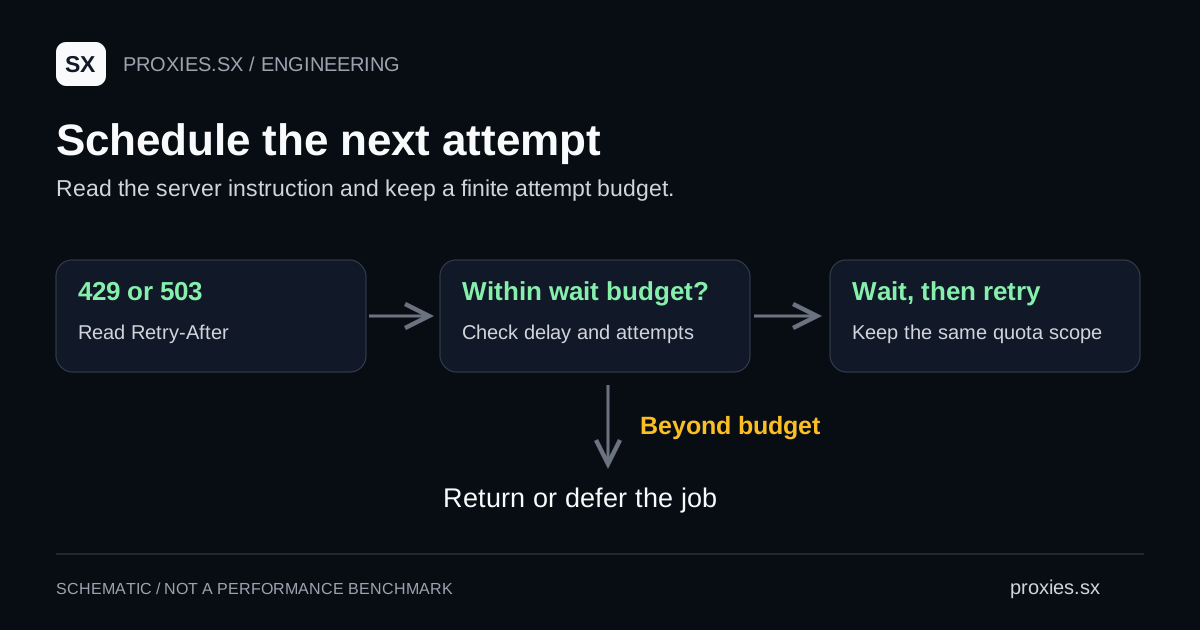
When a server returns HTTP 429, reduce the work you are sending and inspect its rate-limit instructions. If the response includes Retry-After, use that value when scheduling the next attempt. Give the job a retry budget so a temporary failure cannot turn into an unlimited loop.
Determine which quota you reached
RFC 6585 defines 429 as a rate-limit response and allows a Retry-After header. It leaves the identification and counting method to the server. You cannot infer an IP-only limit from the status code.
Start with the responder's documentation and your request log. An API key, account, session or shared service can be the relevant quota boundary. If several workers use one account, each worker seeing a modest local request rate does not establish that the account's aggregate rate is modest.
| Field | Why it helps |
|---|---|
| UTC time and destination | Correlate the event with provider or application logs. |
| Response status and Retry-After | Separate the server instruction from your fallback delay. |
| Active jobs and attempts | Find workers contributing to the same request stream. |
| Documented quota scope | Choose a shared limiter for the correct account or service. |
| Final result | Distinguish valid data from a response that merely has status 200. |
Changing a proxy is not a general solution to a shared account quota. If the response does not explain the limit, stop increasing traffic and ask the service owner for the applicable policy. Use the anti-bot registry for dated technology indicators, not as a measured list of request rates a site will accept.
A 429 can also come from the proxy itself. The Proxies.sx Pool Gateway returns 429 with a code in the body, such as E_RATE_LIMITED_CONN for too many open connections on the account or E_SESSION_LIMIT for too many active sessions, and it sends no Retry-After header. Those limits belong to your account, not to the destination, so the fix is lower concurrency or fewer session ids. The gateway error code reference lists them. A 429 that arrives after the TLS handshake comes from the destination, and the rest of this guide applies.
Read both Retry-After formats
HTTP semantics permits either a non-negative number of seconds or an HTTP date. A date needs a clock comparison. Round a positive fractional difference up when converting it to a whole-second delay, so the conversion does not schedule an early retry.
Retry-After: 30

# Or a date, rather than a number:
Retry-After: Tue, 22 Sep 2026 12:00:00 GMT
Those headers are illustrative. They do not describe a live quota. If the requested wait is longer than this worker is allowed to remain occupied, defer the job to a scheduler or return the response to its caller. Truncating a long server delay to a short local cap would retry earlier than instructed.
Without a usable header, an application can choose an increasing fallback delay with a small random addition. That is a local policy choice. Document it and keep a finite number of attempts. A fixed delay copied from a tutorial has no authority over the service's actual rate limit.
Use a bounded Python retry policy
The downloadable Python example implements an explicit GET loop. It parses both header formats, retries only 429 and 503, and returns the final response when the budget is exhausted. Its defaults allow four total attempts, including the initial request.
# Save retry-after.py as retry_after.py beside your application.
# Dependency: python3 -m pip install requests
from retry_after import get_with_retries

response = get_with_retries(
    "https://example.com/",
    max_attempts=4,
    max_wait=60,
)
try:
    print(response.status_code)
    # If still limited, persist a deferred job or report the failure.
    # Validate the response body before counting a useful result.
finally:
    response.close()
The example deliberately leaves redirects disabled and propagates transport exceptions. Its connect/read timeouts apply to individual operations; they are not a hard deadline for the entire job. Give the calling job runner its own deadline and cancellation policy when that matters.
The local fixture suite covers seconds, HTTP dates, malformed values, oversized waits, exhausted attempts and responses that must not be retried. These tests establish the example's behavior under controlled inputs. They do not measure any website's capacity or guarantee successful access.
If you use urllib3's built-in Retry configuration instead, read the installed version's method allowlist, attempt counts and header handling. Avoid adding another retry layer around it without calculating the combined number of requests.
Coordinate workers and record outcomes
Consider a hypothetical job with ten workers, each allowed four total attempts. It can generate forty attempts if every worker exhausts its budget. This is simple workload arithmetic, not a recommended setting. A per-worker delay alone gives you no account-wide request budget.
Put the scheduling decision at the level where the documented quota applies. Reduce concurrent jobs while investigating, preserve the server's requested next-attempt time, and record retries as traffic costs even when the resulting response is unusable. Our RPS, concurrency and cost guide explains how to keep these measures separate.
For a Proxies.sx client, consult the agent service documentation for the specific product you are calling. A proxy gateway's access policy and your destination's rate limit are separate constraints; successful gateway authentication does not reserve destination capacity.
Common questions
How long does HTTP 429 last?
The status alone does not specify a duration. Use Retry-After when supplied and the service's documented quota policy. If the worker cannot wait that long, defer the job.
Can I use this loop for POST requests?
This example only sends GET. A state-changing operation needs its own documented retry and idempotency behavior before you repeat it.
Should I retry every 403 or 407?
This policy does not. Investigate authorization or proxy authentication first; repeating unchanged credentials adds requests without correcting the configuration.
Sources reviewed September 22, 2026. All retry measurements described here come from local fixtures, not production scraping or paid traffic.
Browse the research library and network references for the registries and the other guides in this series.