Check an IP Against Cloud CIDRs with Python
Match IPv4 and IPv6 addresses against an AWS range file with Python. Keep source hashes, overlapping matches and clear classification limits.
By PROXIES.SX Team. Published . 8 min read.
To check whether an IP appears in a cloud provider's published ranges, parse the address, compare it with the file's CIDR networks and retain the matching records. Save the exact file used for the decision. A match supports a statement about that file; it does not identify the customer or application behind a request.
Define the claim a match supports
A CIDR combines an address with a prefix length, such as 203.0.113.0/24. Prefix membership gives a reproducible answer to a narrow question: whether an address falls inside that range. The Python ipaddress library provides address/network objects and membership operations for both IP versions.
Choose the source according to the decision. For a cloud-file reference, start with the cloud IP range registry. For a crawler allowlist, use the operator's crawler-specific list instead; the Googlebot and Bingbot verification guide explains that distinction.
| Observation | Supported statement | Unsupported leap |
|---|---|---|
| Address matches a source CIDR | The address is inside that published range. | The request belongs to a particular customer. |
| No matching entry | The address is absent from this file's ranges. | The address cannot be associated with the provider. |
| File has a region field | The publisher assigned that field to the record. | The requesting user is physically in that region. |
| File retrieval failed | Current membership could not be checked. | The provider has no ranges. |
Save the publisher file before matching
AWS publishes a JSON range file, but its documentation says the file does not cover all services and excludes bring-your-own-IP ranges. This is why a negative result should be named not_in_this_file, rather than treated as a universal classification.
curl --fail --show-error --location   --connect-timeout 10 --max-time 60   https://ip-ranges.amazonaws.com/ip-ranges.json   --output aws-ip-ranges.json

python3 cidr-match.py aws-ip-ranges.json 203.0.113.7
The command uses a documentation address as an input example, not a claimed AWS machine. For your own check, replace it with the observed source address. Download the matching script into the same directory.
The script emits the file's SHA-256 hash and available publisher version fields with the result. Record your fetch time and source URL alongside that output. A hash lets another reviewer identify the same bytes; it does not establish that the file is current or that its source was trustworthy.
Match IPv4 and IPv6 without enumerating addresses
The complete script uses the AWS JSON keys described in the publisher's schema. The core membership operation is small:
from ipaddress import ip_address, ip_network

address = ip_address("203.0.113.7")
network = ip_network("203.0.113.0/24", strict=True)
print(address.version == network.version and address in network)
# True. This is a documentation-only example.
There is no need to expand a range into every possible address. The downloadable implementation reads both prefixes and ipv6_prefixes, preserves service and region fields, and returns every matching record. It fails on malformed input instead of silently turning a parsing error into a negative match.
We tested IPv4 and IPv6 matches, missing arrays, malformed networks, non-matches and overlapping entries with local fixtures. The test addresses use the documentation spaces defined by RFC 5737 and RFC 3849. Fixture success verifies the matcher's behavior, not a provider's present inventory.
Keep overlapping records until you know the question
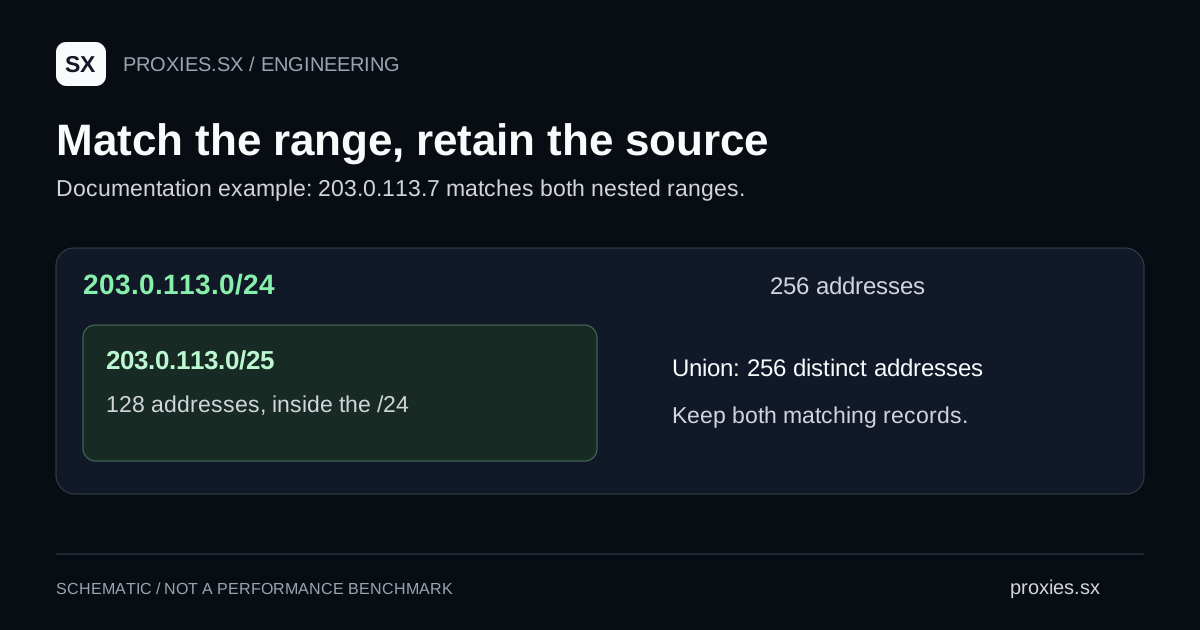
Consider two hypothetical records: 203.0.113.0/24 and 203.0.113.0/25. The address 203.0.113.7 matches both. If one record carries a broad service label and another a narrower label, returning only the first would discard source information.
These two ranges contain 256 and 128 addresses respectively, but the smaller range sits inside the larger. Adding them produces 384 range memberships, while their union covers 256 distinct addresses. This calculated illustration shows why prefix counts, summed range sizes and unique address coverage answer different questions.
Our registry measurement methodology explains its own counting unit. Keep that unit in reports instead of relabeling a prefix-string count as available proxies, servers or customers.
Handle refresh failures explicitly
For a scheduled classifier, download into a temporary file, validate the complete document, then publish a new version atomically. Retain the previous accepted snapshot and its timestamp. If the update fails, expose a stale-data state with its age or return an unknown result, according to the decision's requirements.
Do not clear an allowlist because an HTTP request timed out. Equally, do not label an old list current merely because a job ran. Decide the permitted data age before automating firewall or access-policy changes, and keep a rollback path.
The AWS source record links to the publisher file and a dated measurement. Use it to inspect provenance. Use the carrier registry when the question concerns an operator or ASN instead of membership in an AWS publication.
Common questions
Can this script parse every provider file?
No. It expects the AWS schema. Azure, Google Cloud and other publishers use different field structures; write and validate a parser for the selected source.
Does a cloud match mean the traffic is a bot?
No. Network-range membership does not establish the sender's software, purpose or authorization.
Should I use this as a blanket allowlist?
Choose a list scoped to the service you intend to trust. A whole cloud provider includes workloads unrelated to a particular crawler or customer.
Documentation reviewed September 22, 2026. Numerical examples are calculated from documentation ranges; they are not measurements of live cloud stock.
Browse the research library and network references for the registries and the other guides in this series.