SOCKS5 vs SOCKS5h: DNS in curl and Python
Compare local and proxy-side DNS in curl and Python Requests. Test hostname resolution and understand what a browser DNS leak test establishes.
By PROXIES.SX Team. Published . 7 min read.
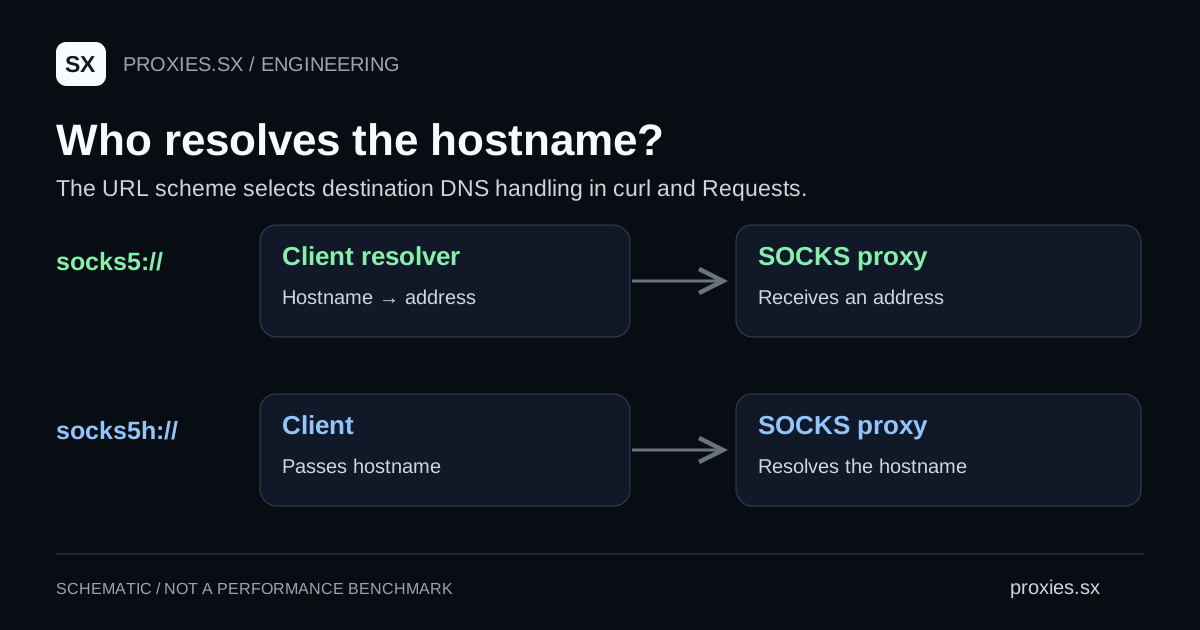
In curl and Python Requests, socks5:// resolves the destination hostname on the client, while socks5h:// passes that hostname to the SOCKS proxy for resolution. Choose the setting based on where the name should be resolved, then test it in the application that will make the requests.
Choose who resolves the destination
The underlying SOCKS5 request can carry an IPv4 address, an IPv6 address or a domain name. Those address types are defined in RFC 1928. The extra h in the URL scheme is a client convention for selecting hostname handling, rather than a new SOCKS protocol version.
| Setting | Destination lookup | What the SOCKS request carries |
|---|---|---|
socks5:// | Client resolves the hostname. | A resolved address. |
socks5h:// | Proxy resolves the hostname. | The destination hostname. |
| A literal IP destination | No destination-name lookup is needed. | The specified address. |
This selection concerns the destination. If you configure the proxy itself with a hostname, the client still needs a way to find that proxy. Remote destination resolution also does not specify the proxy operator's upstream resolver or guarantee that its DNS server shares the exit IP's city.
For the broader protocol choice, see SOCKS5 versus HTTP proxies. Keep that choice separate from this article's narrower question about hostname resolution.
Compare the two curl settings
Use the same destination and proxy host for both commands. Put any required authentication in a private curl configuration file, following the configuration example. Keep the destination as a hostname so the test exercises resolution.
# The private file supplies proxy-user, not a proxy URL.
curl --config proxy-auth.conf   --proxy socks5://PROXY_HOST:PROXY_PORT   --noproxy "" --connect-timeout 10 --max-time 30   --output /dev/null --silent --show-error https://example.com/

curl --config proxy-auth.conf   --proxy socks5h://PROXY_HOST:PROXY_PORT   --noproxy "" --connect-timeout 10 --max-time 30   --output /dev/null --silent --show-error https://example.com/
curl's documentation defines the remote hostname option. The empty --noproxy value in these commands prevents a configured exclusion from silently bypassing this test's proxy. Both commands can return successfully while using different resolver paths, so success alone does not answer the DNS question.
If only one command works, preserve its error output and check name resolution at the failing side. Do not immediately conclude that the proxy is offline. A name can be resolvable in one network and unavailable in another; the connection and the name lookup are separate steps to inspect.
Configure Python Requests
Requests requires its optional SOCKS dependency for these URLs. Its SOCKS documentation specifies the same local/remote distinction. Build the proxy URL from separate values so reserved characters in credentials are encoded correctly.
# python3 -m pip install 'requests[socks]'
import os
from urllib.parse import quote
import requests

user = quote(os.environ["PROXY_USER"], safe="")
password = quote(os.environ["PROXY_PASSWORD"], safe="")
host = os.environ["PROXY_HOST"]  # Hostname or IPv4 address, no scheme.
port = int(os.environ["PROXY_PORT"])
proxy = f"socks5h://{user}:{password}@{host}:{port}"

with requests.Session() as session:
    session.trust_env = False  # Use this explicit configuration.
    response = session.get(
        "https://example.com/",
        proxies={"http": proxy, "https": proxy},
        timeout=(5, 20),
        allow_redirects=False,
    )
    print(response.status_code)
    response.close()
Supply the environment variables through your local secret-management workflow rather than printing them in a notebook. This example disables environment-derived settings to make the configuration explicit. If your environment needs a private certificate authority, configure its trust bundle explicitly too; keep certificate verification enabled.
For the Proxies.sx Pool Gateway, the product connection reference documents SOCKS5 on port 7001. Dedicated ports have their own connection details. Copy the configuration for the product you actually use instead of replacing a port number in an unrelated example.
Verify the resolver path in the same client
For a controlled test, use a hostname in a domain you operate and correlate its authoritative DNS logs with the client request. Give each attempt a distinct test hostname so an earlier lookup is less likely to answer it from a cache. Record the client configuration and the time before drawing a conclusion from the resolver log.
The visible recursive resolver is an observation about that lookup. It does not identify every intermediate machine or prove a geographic route. A browser DNS leak test describes requests made by that browser context; it cannot establish how a separate Python process resolves names. To see what a public resolver such as 1.1.1.1 or 8.8.8.8 does with a query, including DNSSEC validation and client-subnet forwarding, use the public DNS resolver registry.
Our local protocol fixture observes whether curl sends an address or a domain-name field to a mock SOCKS server. That is a repeatable check of the client option. The fixture stops before forwarding traffic, so it makes no claim about a commercial proxy's resolver, location or anonymity.
Use the SOCKS5 connection tester for a separate connection check. Once DNS behavior is understood, return to the end-to-end proxy test. Keep a record of both the resolved request and the actual target response, because a working hostname lookup does not establish useful application output.
Common questions
Does SOCKS5h encrypt DNS?
The scheme selects where destination resolution happens. It is not an encryption guarantee. Evaluate the client-to-proxy transport and the proxy's resolver separately.
Will a browser accept a socks5h URL?
Check that browser's configuration interface. The convention documented here applies to curl and Requests; other clients may expose a separate remote-DNS setting or accept different URL schemes.
Why does the exit-IP test pass while a target fails?
The tests may resolve different names or exercise different paths. Save the exact failing hostname and error, then compare resolution before changing the network configuration.
Documentation reviewed September 22, 2026. Commands use placeholders; the protocol check uses a local mock server and does not measure provider DNS behavior.
Browse the research library and network references for the registries and the other guides in this series.