Binding a Proxy to Every Profile in Afina Browser: Rotating vs Static for Multi-Accounting
If you run more than a handful of accounts, the proxy layer is where most setups quietly fall apart. People obsess over the antidetect browser fingerprint and then route ten profiles through one shared IP, or they buy a rotating proxy for a task that needs a stable address. The result is the same: linked accounts, verification loops, sudden logouts.
The short answer
Pick a rotating proxy for breadth and a static residential proxy for identities that must last, give every serious profile its own IP, match the connection type to whether you need UDP, and check that the whole fingerprint agrees with the address before you rely on it. Do those four things inside Afina Browser and the proxy layer stops being the part that gets your accounts caught.
This guide is about the practical difference between a rotating proxy and a static residential proxy, when each one actually fits, and why one proxy per profile is the rule that carries multi-accounting. Then we get into the concrete part: how to bind, check and keep proxies consistent inside an antidetect browser using Afina, including a short self-check so a SOCKS5 setup does not leak. No theory for its own sake, just what changes the outcome when you scale from five profiles to five hundred.
What rotating and static proxies actually are
A rotating proxy gives you a new exit IP on some schedule or on every request. The pool sits behind a single gateway address, and the provider swaps the real exit for you. It is great when you want volume and variety from many addresses without buying them one by one. It is a poor fit when a session needs to look like one steady person sitting in one place, because the IP under your feet keeps changing.
A static proxy holds the same exit IP for as long as you keep the line. Two flavors matter here. A static residential proxy (often sold as a sticky ISP proxy) is an address that belongs to a real consumer internet provider but stays assigned to you, so it reads like a normal home connection that does not move. A dedicated datacenter proxy is also static, cheaper and faster, but it lives in a hosting range that stricter platforms recognize on sight.
For a deeper primer on the categories and how rotation works under the hood, Afina's write-up on proxy types and their use cases is a solid reference to keep open alongside this article.
One clarification that saves confusion later: the antidetect browser does not rotate anything itself. Rotation is a feature of the proxy provider. In Afina you can store an optional IP-change URL next to a proxy so you can trigger the provider's rotation when you want it, but the browser's job is to bind an address to a profile and keep the whole fingerprint consistent with that address, not to invent new IPs.
When to use which: a task-by-task table
The honest answer to "rotating or static" is that it depends on whether the task is a long-lived identity or a short burst of many identities. Registration and warming of a persistent account want stability. Scraping and one-off checks want breadth. Below is how the split usually falls in practice.
| Task | Better choice | Why |
|---|---|---|
| Running and warming persistent accounts | Static residential / sticky ISP | The IP must not shift mid-session; a moving address triggers re-verification |
| Bulk registration where each account keeps living | Static residential, one per profile | Each identity needs its own steady home address |
| Large-scale scraping or price monitoring | Rotating | You want many exits and do not care about session continuity |
| Occasional availability or SERP checks | Rotating | Short requests, throwaway sessions, volume matters more than stability |
| Payment or KYC-sensitive flows | Static residential, dedicated to one profile | Any IP change reads as risk to anti-fraud systems |
| High-volume automation on cheap targets | Dedicated datacenter (static) | Fast and inexpensive when the target does not scrutinize ASN |
Read the table as a starting bias, not a law. A social profile you plan to keep for a year belongs on a static residential line even if rotating is cheaper per gigabyte. A one-hour data pull across thousands of pages belongs on a rotating pool even though each individual request looks like a stranger.
Here is the same view by address type, since some readers think in addresses rather than tasks:
- Residential, static: long-lived accounts, payments, anything that must look like a real household.
- Residential, rotating: broad scraping where each request can be a different household.
- Mobile: the hardest to flag on strict platforms because carrier-grade NAT shares the IP with real users, but the most expensive per gigabyte.
- Datacenter, static: automation and testing against targets that do not inspect the ASN closely.
Why one proxy per profile carries multi-accounting
Multi-accounting works when each account looks like a separate person on a separate device on a separate connection. Cookies, storage and fingerprint handle the device side. The IP handles the connection side, and it is the signal platforms trust most because it is the hardest for you to fake convincingly.
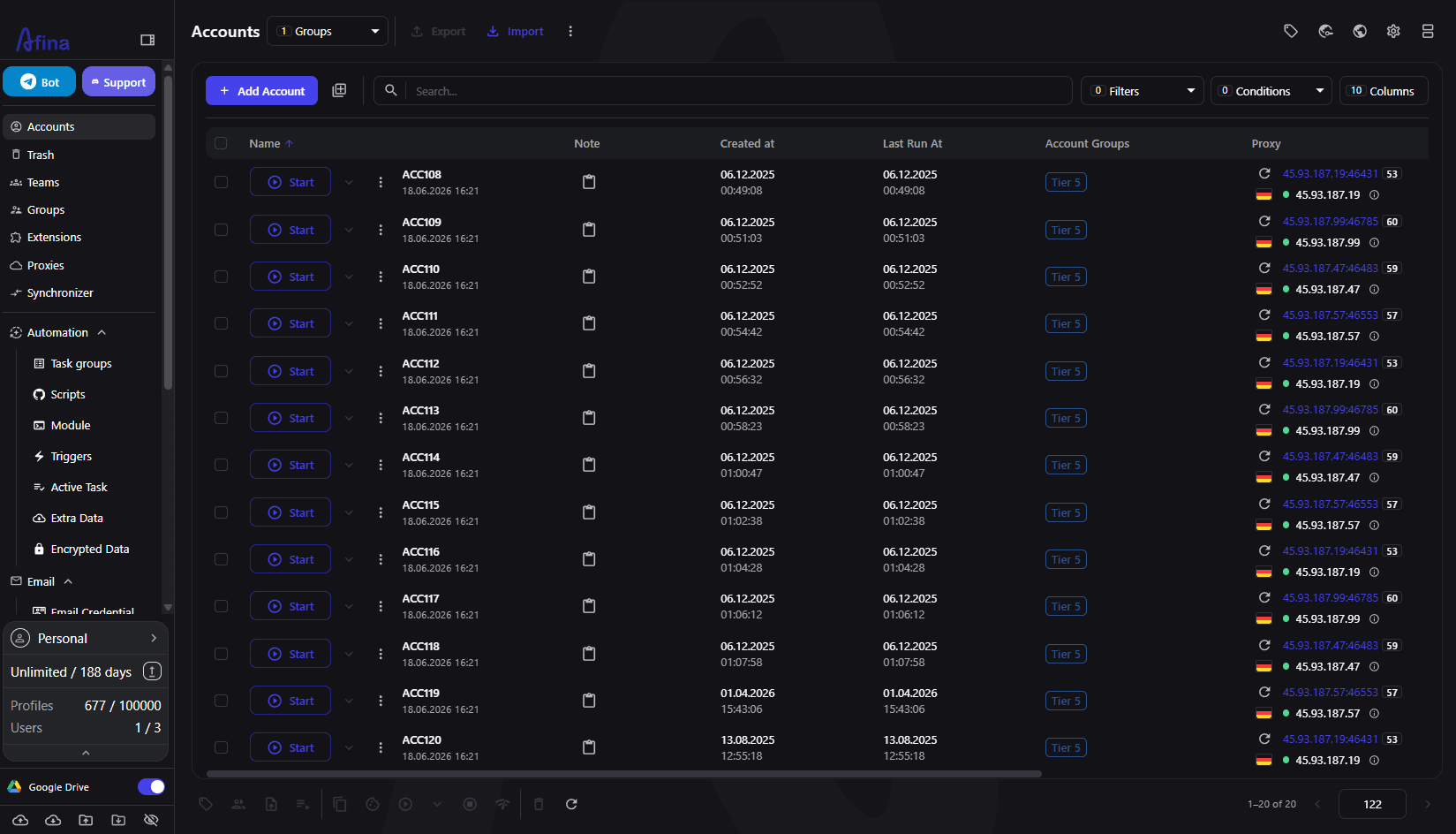
Share one IP across ten profiles and you have handed anti-fraud a clean grouping key. The accounts can have perfect, unique fingerprints and still get linked, because ten "different people" logging in from the exact same address within minutes is a pattern no story explains. This is the single most common reason otherwise careful setups get swept in a ban wave.
In Afina each account is an isolated browser profile with its own cookies, storage and sessions, and the intended model is one proxy bound to one profile. That binding is what turns a folder of profiles into a set of independent identities. The fingerprint controls (Operating System, User-Agent auto-distributed across a batch, Canvas, WebGL, Audio, ClientRects spoofing, blocked ports) matter, but they sit on top of a per-profile IP, not instead of it.
There is a real cost tension worth naming. Static residential IPs bought one per profile are the expensive option, and at a thousand profiles that adds up. The reasonable middle ground for many teams is static residential for the accounts that must survive long term, and a rotating pool reserved for the disposable, high-volume work. You are matching spend to how much each account is worth, not buying the most expensive line for everything.
How to bind and check proxies in Afina
Getting one proxy onto one profile in Afina is deliberately plain. You add a proxy with its host, port, login and password, an optional IP-change URL, and an optional note, then a check button reports the address as active or inactive. That check is the moment to confirm the line is alive before you ever attach it to an identity.
For scale you rarely add proxies one at a time. Afina takes a bulk paste in the form 192.168.0.1:8000:login:password, which is treated as HTTP by default, or socks5://192.168.0.1:8000:login:password when you want SOCKS5. There is an Excel import and export for the whole list, and an "apply to all" action to set one connection type across everything you just pasted. If you are moving from another setup, profile migration from AdsPower, Dolphin Anty and Vision brings existing profiles in without rebuilding them.
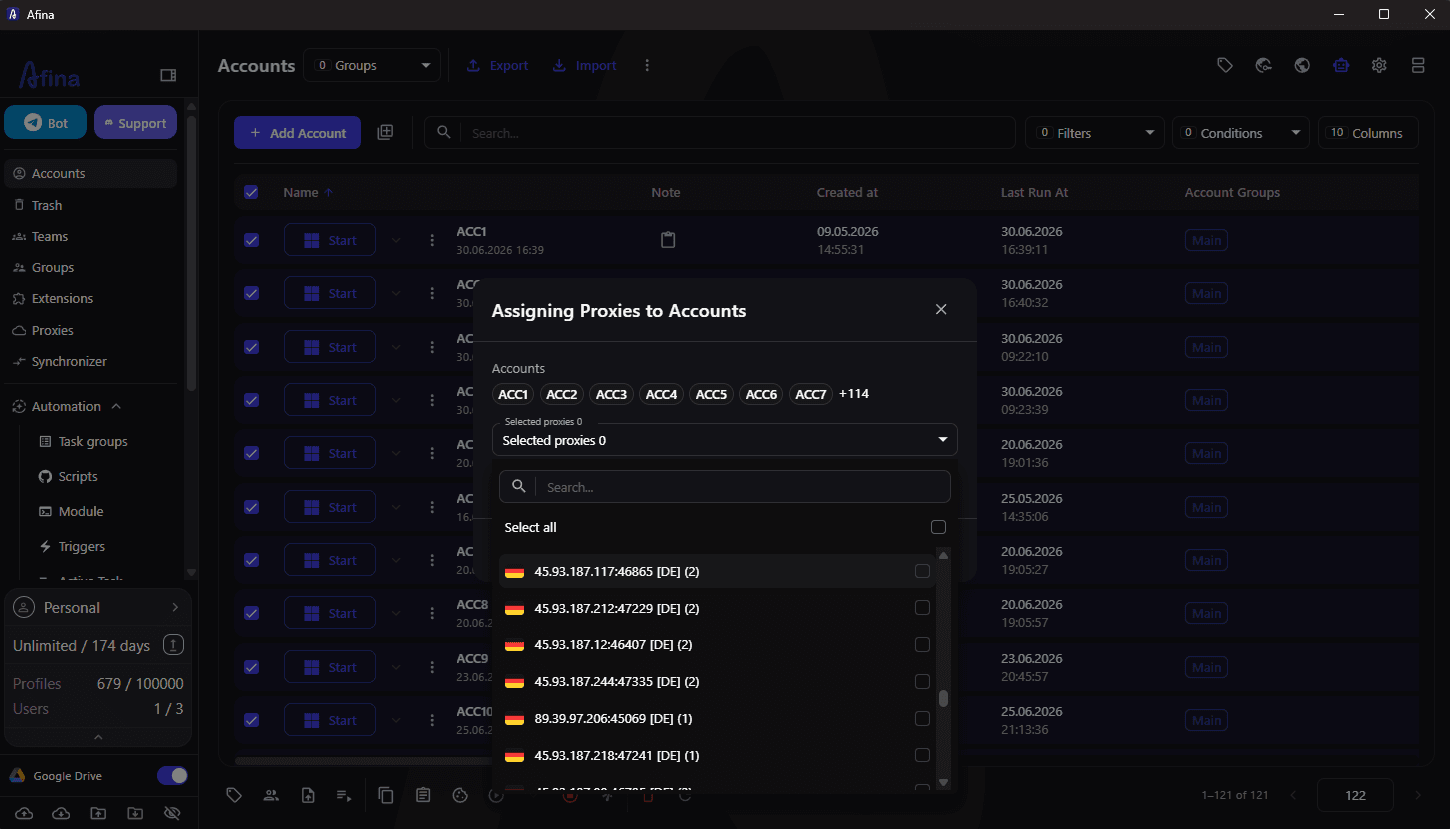
Assigning at volume is its own step. When you assign proxies in bulk you can pull from your saved proxies, take a random address from the pool, or leave a profile with none, and an "only unassigned proxies" option stops you from accidentally handing the same line to two profiles. The mechanics of that flow are documented in Afina's guide to assigning proxies in bulk, which is the page to follow when you are wiring up a fresh batch.
A choice you make early is HTTP versus SOCKS5, and it is not cosmetic. HTTP and HTTPS proxies are standard TCP and cover ordinary browsing fine. SOCKS5 is what you need for UDP support, and UDP is what WebRTC, QUIC and WebTransport ride on. In Afina those turn on automatically when the SOCKS5 proxy genuinely tunnels UDP, so there is no manual WebRTC switch to flip. The catch is that plenty of proxies advertise UDP without truly carrying it, and a fake-UDP line leaks. The transport layer, not a browser setting, is what decides whether WebRTC behaves.
Keeping the setup consistent and checking for leaks
Binding the IP is half the job. The other half is making the rest of the identity agree with that IP, because a mismatch is as loud as a shared address. Afina keeps the fingerprint coherent with the proxy geography through Timezone by IP and Language by IP, so a profile on a German residential line reports a German timezone and German-first browser language headers instead of whatever your real machine says. When timezone, language and fingerprint all line up with the exit IP, the identity reads as one consistent person.
A SOCKS5 line that only pretends to carry UDP is the classic cause of a WebRTC leak, where your real address slips out even though a proxy is set. Afina's breakdown of UDP over SOCKS5 walks through why the transport layer, not a browser toggle, governs whether WebRTC ends up exposing the machine behind the proxy.
One trap worth flagging: if a VPN extension is installed inside the profile, it overrides Afina's proxy and sites see the VPN's IP, not the one you assigned. So keep the profile clean of connection extensions unless you actually want them in charge.
Before you trust a profile with real activity, run a fast self-check:
- Open browserleaks.com/webrtc and confirm the WebRTC public IP matches the proxy's remote IP; if they differ, the SOCKS5 line is not truly tunneling UDP and you have a leak.
- Confirm the reported timezone matches the IP's country, which Afina's Timezone by IP should already handle.
- Confirm the browser language headers match the proxy geo, again covered by Language by IP.
- Re-run the proxy check so the status reads active, and use the account-level bulk "check proxy" when validating a whole batch at once.
- Verify no VPN or proxy extension is loaded inside the profile that could override the assigned address.
A good habit before serious use is to warm the profile first. Afina's Cookie Robot visits a list of URLs and generates cookies and sessions on its own, so a fresh identity has some believable browsing history behind the assigned IP before it does anything that matters. Warm through the same proxy you will run the account on, never a different one, or the history and the live session tell two different stories.
Where PROXIES.SX fits in
Afina binds the address and keeps the fingerprint honest; it needs a supply of clean lines to bind. PROXIES.SX 4G/5G mobile and residential IPs are pay-per-GB with no per-port fees, so you can dedicate one real carrier IP per profile across large batches without a separate bill for every port. See the Afina partner review for the full antidetect-browser breakdown, or the pricing page to start from $4/GB.
Get Afina Browser
Bind one proxy per profile and keep the whole fingerprint consistent with the address.
One proxy per profile, on IPs built to last
Give every serious Afina profile its own real 4G/5G carrier or residential IP. Pay per GB, no per-port fees, dedicate one line per identity across large batches.
FAQ
For accounts you intend to keep, yes - one proxy per profile is the safe default, because a shared IP is the easiest way for anti-fraud to link profiles together. For disposable, high-volume tasks like scraping you can lean on a rotating pool instead, where session continuity does not matter. Match the spend to how much each account is worth rather than buying one dedicated line for everything.
Generally no. A real account wants a stable address, and an IP that changes mid-session looks like account theft to most platforms, which triggers re-verification or a logout. Use a static residential or sticky ISP line for anything long-lived, and save rotation for throwaway sessions where each request can look like a different person.
HTTP and HTTPS proxies handle ordinary TCP browsing fine, but they do not carry UDP. SOCKS5 does, and UDP is what WebRTC, QUIC and WebTransport depend on. In Afina those features enable automatically when the SOCKS5 proxy genuinely tunnels UDP, so choosing SOCKS5 is what lets the browser behave like a normal one instead of a locked-down half version that stands out.
The quickest test is browserleaks.com/webrtc. If the WebRTC public IP does not match your proxy's remote IP, UDP is not being tunneled properly and your real address can leak despite the proxy. Also confirm the timezone and browser language match the IP's country, and make sure no VPN extension inside the profile is quietly overriding the address you assigned.
No, and that distinction matters. Rotation is a proxy-provider feature, not a browser feature. Afina binds an address to a profile and keeps the fingerprint consistent with it, and it can store an optional IP-change URL per proxy so you can trigger your provider's rotation when you choose, but the browser itself does not generate new IPs.